Visit Records
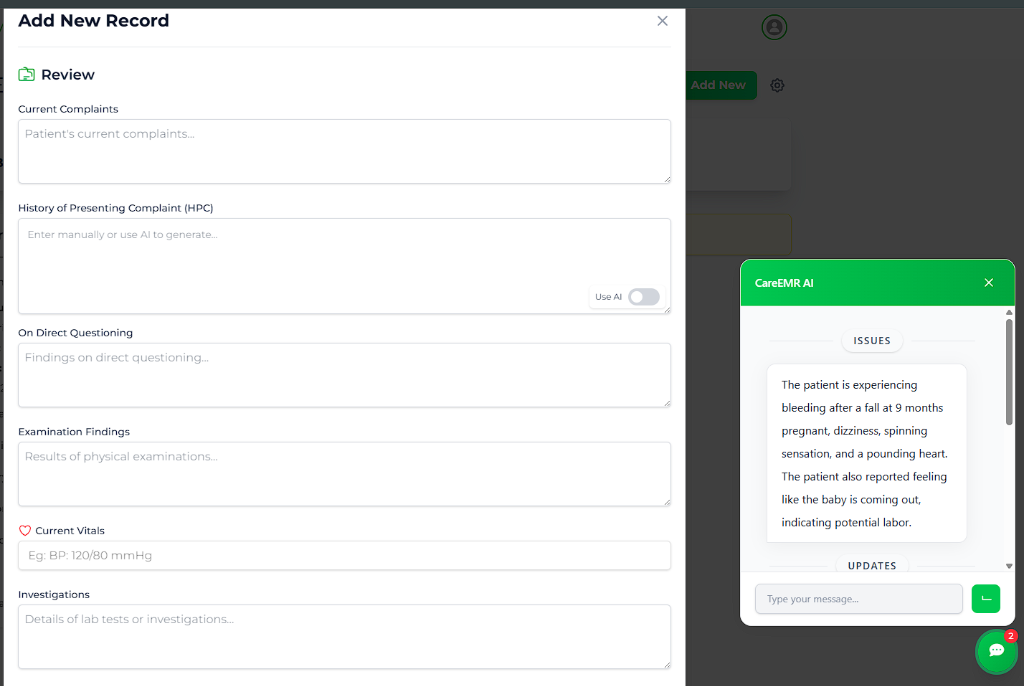
For every subsequent visit, you will document findings using the Add New Record interface.
Creating a Visit Record
- Open the Patient Profile.
- Click Add Visit Record.
- Fill in the sections:
- Current Complaints: Patient's reported issues.
- Examinations: Physical findings.
- Vitals: Updated BP, Weight, Fetal Heart Rate.
- Plan: Medication and lifestyle advice.
AI Assistance
The Add New Record form includes integrated AI features to assist in documenting clinical encounters:
-
Conversation Analysis: Upon opening the form, the AI automatically analyzes the patient's recent conversation history. Relevant clinical details are presented in the AI Sidebar. If no chat history exists, the sidebar displays: "Patient has had no chat with CARE AI so far".
-
HPC Generation: In the History of Presenting Complaint (HPC) section, toggle "Use AI" to open/view the sidebar. The AI utilizes the analyzed chats to propose a concise history.
-
Clinical Impressions: When you reach the Impression field, a pop-out will appear asking if you want to generate clinical insights. If confirmed, the AI reviews the data and shares its clinical impression to support your decision.
Clinician Oversight
Always review and validate AI-generated content before saving the record to ensure clinical accuracy.